


Our verdict
A light, automatic free SEO plugin that handles the basics well, but its best extras need the separate Pro plugin.
- Free plugin covers meta tags, Open Graph, canonical, robots and sitemaps with sensible defaults
- Light load in our lab: page weight +4.5 KB and no Lighthouse change (99 before and after)
- Clean settings screen with six tabs and no setup wizard, so it is quick to configure
- No keyword or readability analysis in the free plugin, so editors used to Yoast-style scoring will miss it
- Schema builder, internal links and Search Console reports need the separate Pro plugin
- Left two options (slim_seo, slim_seo_db_version) in the database after uninstall
At a glance
- Developer
- eLightUp
- Category
- SEO Plugin
- Version tested / latest
- 4.11.7 / 4.11.7
- Last updated
- November 28, 2026
- Active installs
- 70,000+
- WP.org rating
- 4.7/5 (137)
- Requirements
- WordPress 6.7 or later, PHP 7.4 or later
- Tested up to
- 7.1.5
- Support resolved (2 months)
- 2 of 5
- First released
- December 31, 2018
- Free version
- Yes
- Pro from
- $59/year
- Renewal
- $59/year
- Refund policy
- 14-day refund; vendor terms say a refund applies if the team cannot resolve your problem.
- Security
- Public databases list past issues: a Contributor+ post-meta disclosure fixed in 4.9.11 (Patchstack and WPScan disagree on the date), an access-control (IDOR) issue up to 4.10.0, and a stored XSS up to 4.11.5 reported fixed in 4.11.6 (one source lists the fix version as not reported). Current release 4.11.7 has no known unpatched issue in the sources we found (checked 2026-11-28). Not verified directly on Patchstack/WPScan pages.
This Slim SEO review was written by Daniel Carter on 2026-11-28. We have no affiliate link for Slim SEO, so this review has no paid links.
Slim SEO review: what it is and who it’s for
Slim SEO is a free WordPress SEO plugin from eLightUp, the team behind Meta Box. Its idea is to do the basics automatically: meta titles and descriptions, Open Graph and X tags, canonical URLs, robots tags, XML sitemaps and basic schema. You switch features on or off instead of filling in a long setup wizard.
It suits bloggers, small business sites and developers who want clean SEO output with little to configure. It is less suited to people who want a keyword-scoring panel in the editor, because the free plugin does not give one.
Slim SEO is freemium. The free plugin is on WordPress.org. The paid Slim SEO Pro is a separate plugin that adds a visual schema builder, internal link suggestions, Google Search Console reports and a writing assistant, from $59/year.
How we tested
We tested the Slim SEO release that WordPress.org offered on 2026-11-28 (listed as 4.11.7) on the WPScorix Lab: WordPress 7.1.4, PHP 8.5, Twenty Twenty-Five, no other plugins. We reset the lab, measured /lab-test-page/ (median of 3), installed and activated the plugin, measured again, walked through every admin tab, then deleted the plugin and checked what it left behind. We did not buy or test Slim SEO Pro.
Key features
Feature check
| Feature | Free | Pro | Our result |
|---|---|---|---|
| Meta titles and descriptions | ✓ | ✓ | Works |
| Open Graph and X tags | ✓ | ✓ | Works |
| XML sitemaps | ✓ | ✓ | Works |
| Redirect manager | ✓ | ✓ | Works |
| AI meta generation (own API key) | ✓ | ✓ | Partial |
| Schema markup | ✓ | ✓ | Partial |
| Internal linking suggestions | ✗ | ✓ | Pro only |
| Google Search Console integration | ✗ | ✓ | Pro only |
| llms.txt file | ✗ | ✗ | Not supported |
Automatic meta tags and social tags
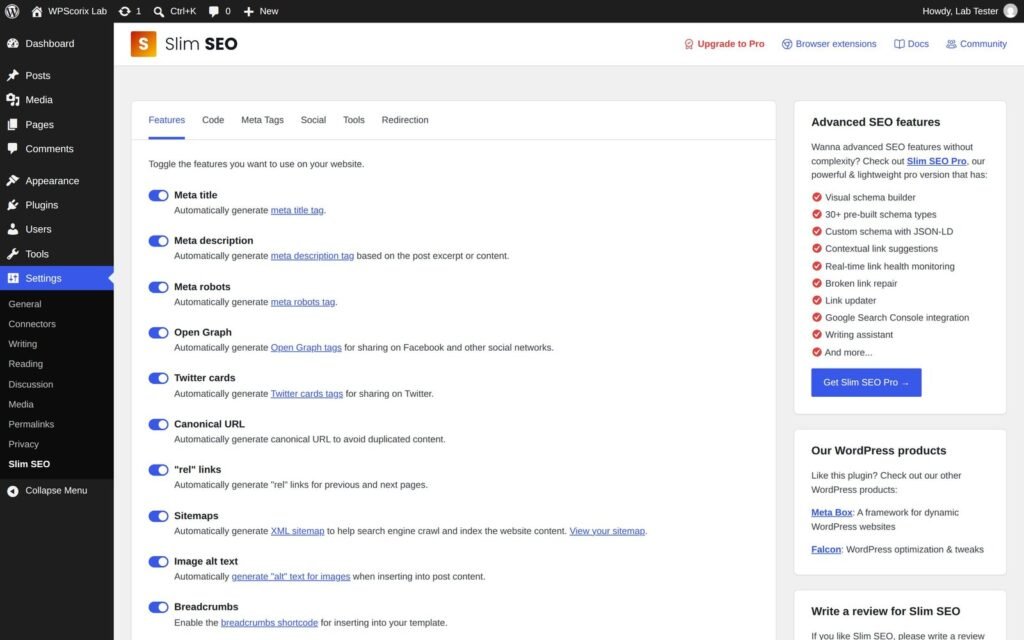
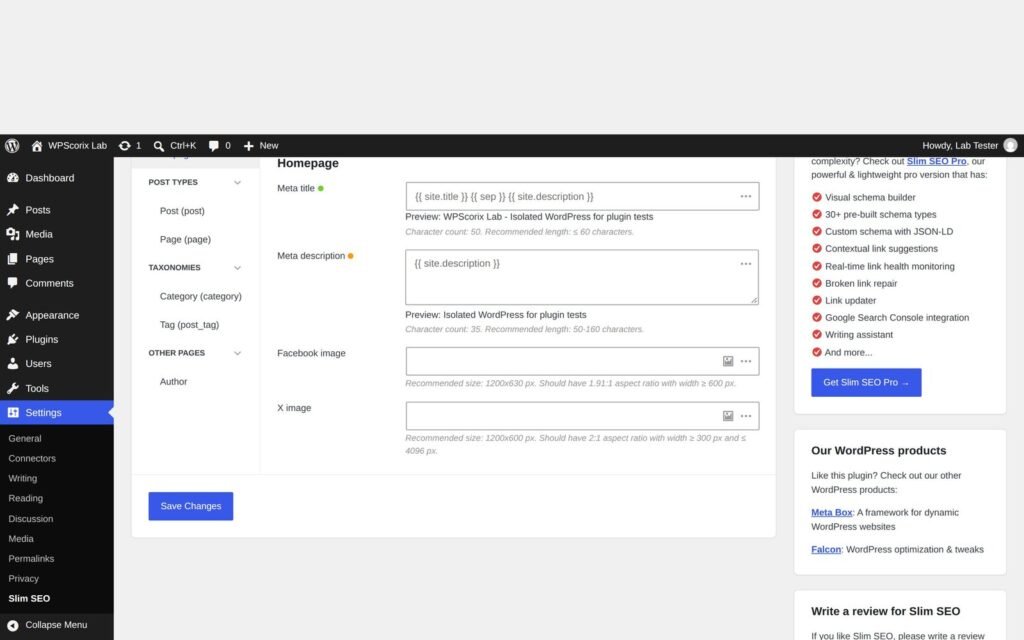
The Features tab lists toggles for meta title, meta description, meta robots, Open Graph, X (Twitter) cards, canonical URL and “rel” links for paginated pages. Everything is generated from your post title, excerpt or content. The Meta Tags tab lets you set a homepage title and description with a live preview, a character count and a recommended length, and set per-post-type, taxonomy and author defaults.
XML sitemaps, robots.txt and code insertion
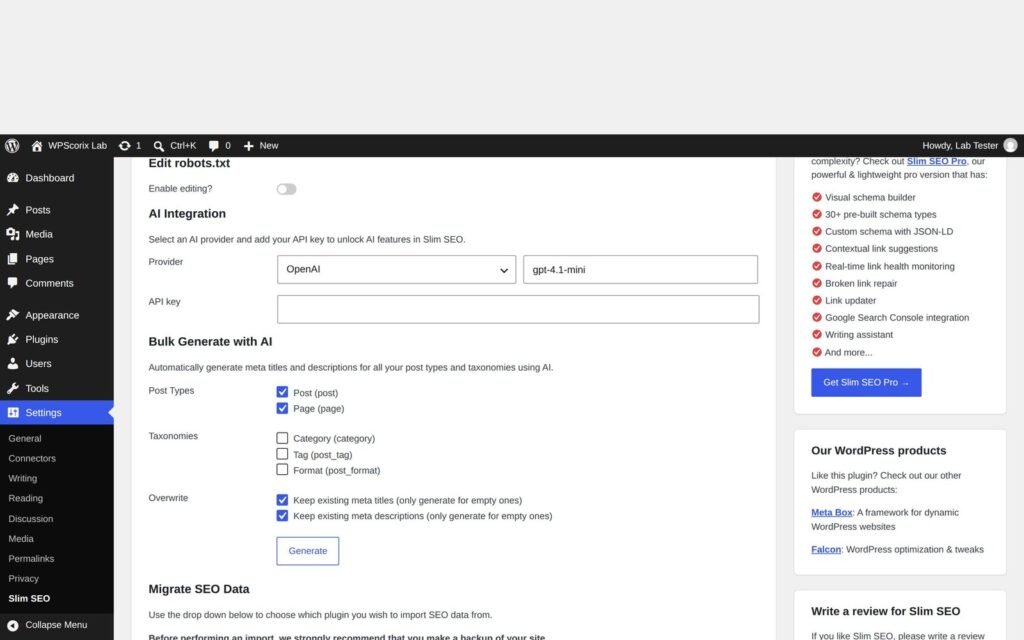
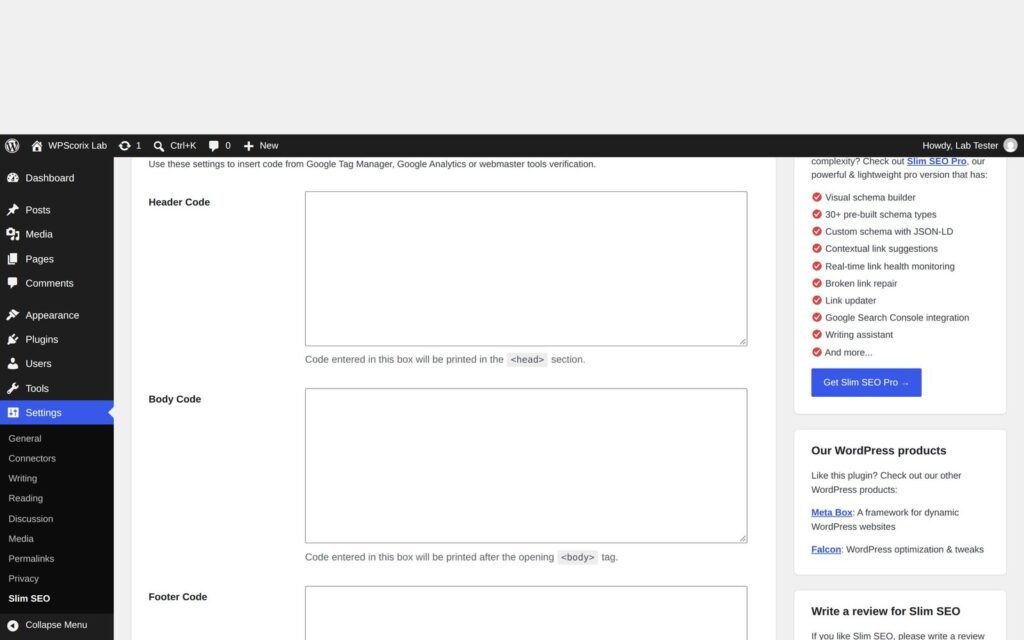
A sitemap toggle sits on the Features tab, and the Tools tab has an optional robots.txt editor. A Code tab lets you add header, body and footer code, which is handy for analytics or site verification tags. We saw these controls in the admin; we did not validate the sitemap output itself.
Redirects and 404 handling
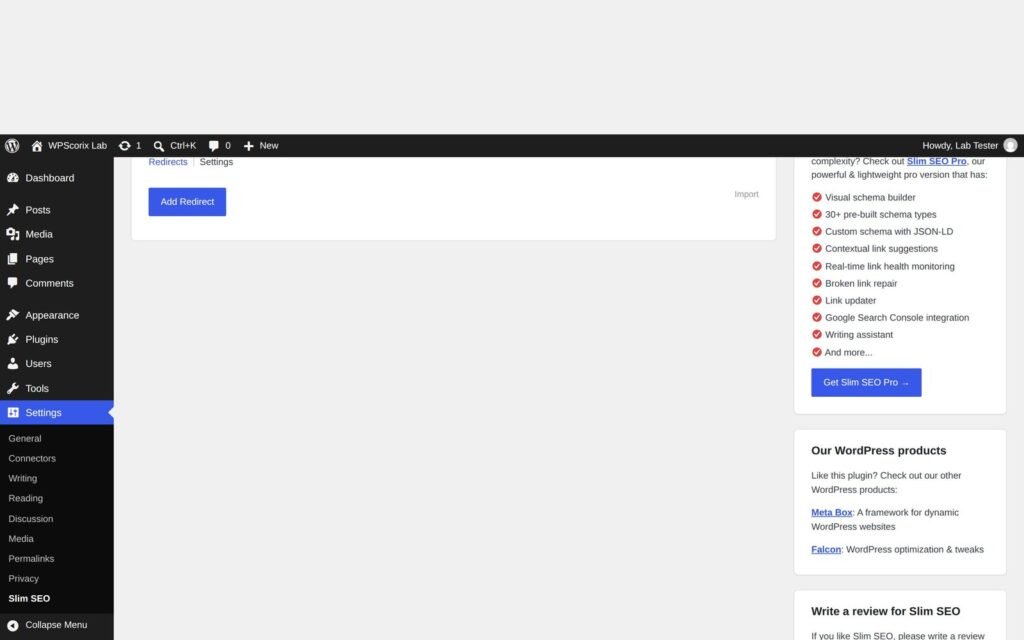
A Redirection tab lets you add and import redirects and has a Settings sub-tab. The vendor docs describe monitoring 404 pages and creating redirects for them, and the plugin readme describes automatic redirects when a slug changes. We did not generate 404s to test these.
AI meta generation (bring your own key)
The Tools tab lets you pick OpenAI, Google Gemini, Anthropic Claude or OpenRouter, add your own API key, and bulk-generate meta titles and descriptions for chosen post types and taxonomies. You can keep existing values or overwrite them. The vendor docs say post title and content are sent to the AI provider. We did not run a generation because it needs a paid API key.
What needs Pro
The settings page lists the Pro extras: a visual schema builder with 30+ schema types, custom JSON-LD, contextual link suggestions, link health monitoring, Search Console integration and a writing assistant. Basic schema is generated in the free plugin per the vendor, but we did not inspect the output. The vendor says it has no plans for llms.txt support.
Setup and ease of use
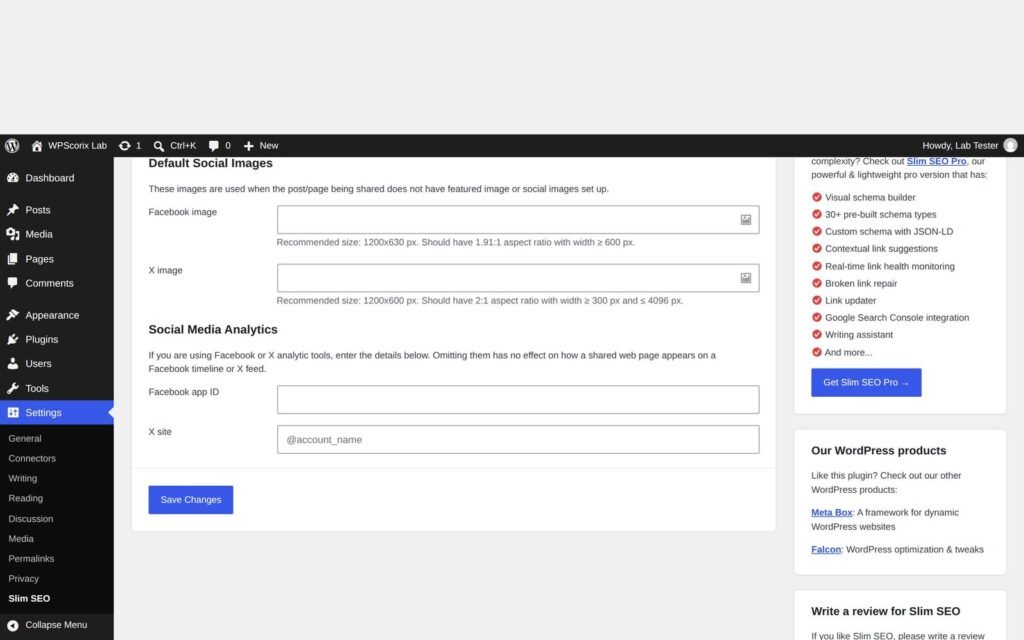
There is no wizard. After activation we opened Settings → Slim SEO and found sensible defaults with features already toggled on. Reaching a working setup took a couple of minutes: look over the toggles, set a homepage title and description, optionally add default social images.
The layout is clean: tabs for Features, Code, Meta Tags, Social, Tools and Redirection, each with short descriptions. Nothing confused us, though we could not find a per-post SEO panel in the block editor sidebar view we captured, so check the post-edit screen yourself on your theme.
Upsells are present but quiet. A “Upgrade to Pro” link sits in the header and a Pro feature panel appears at the bottom of tabs. There were no pop-ups or nag banners in our session.
Slim SEO screenshots
Performance results
Performance results
| Metric | Without plugin | With plugin | Difference |
|---|---|---|---|
| TTFB | 66 ms | 59 ms | −7 ms (−10.6%) |
| Page weight | 230.90 KB | 235.40 KB | +4.50 KB (+1.9%) |
| CSS/JS files | 4 files | 4 files | No change |
| DB queries | 22 queries | 26 queries | +4 queries (+18.2%) |
| PHP memory | 8 MB | 10 MB | +2 MB (+25.0%) |
| Lighthouse score | 99 score | 99 score | No change |
| Autoloaded options | 49.70 KB | 49.50 KB | −0.20 KB (−0.4%) |
In our Slim SEO review, the plugin added a small cost in the lab. Compared with the clean baseline, queries rose from 22 to 26, peak PHP memory from 8 MB to 10 MB and PHP time from 37 ms to 58 ms. Page weight grew by 4.5 KB, mostly the extra head tags.
TTFB (59 ms vs 66 ms) and Lighthouse (99 both) did not change in any meaningful way; the TTFB difference is within run-to-run noise (single runs ranged 58–164 ms). CSS/JS files stayed at 4 and autoloaded options were unchanged at about 49.5 KB.
Compatibility, security and support
Slim SEO needs WordPress 6.7 or later and PHP 7.4 or later. WordPress.org lists it as tested up to 7.1.5. We saw no errors on WordPress 7.1.4 and PHP 8.5. Some WordPress.org reviews report conflicts with ACF and Jetpack, and a sitemap-redirect complaint; we did not reproduce them.
Security. Public databases list past vulnerabilities, for example a Contributor+ post-meta disclosure fixed in 4.9.11 (Patchstack and WPScan disagree on its date), an access-control issue up to 4.10.0 and a stored XSS up to 4.11.5, reported fixed in 4.11.6. Sources disagree on some fix versions. We found no unpatched issue for the current release, but we did not open Patchstack or WPScan pages directly (checked 2026-11-28).
Uninstall. Deleting the plugin left two options behind (slim_seo and slim_seo_db_version). It left no tables, scheduled tasks or files. Your settings survive a reinstall, but the database is not fully clean.
Support. This is based on community data, not our own support test. WordPress.org shows 2 of 5 forum threads resolved in the last two months. The rating is 4.7/5 from 137 reviews. Reviewers praise fast replies and documentation, and the founder answers in the forum. Others report slow or unresolved threads. Paid users get one year of support. Sources: WordPress.org plugin and support pages, checked 2026-11-28. Documentation is at docs.wpslimseo.com.
Pros and cons
Pros and cons
Pros
- Free plugin covers meta tags, Open Graph, canonical, robots and sitemaps with sensible defaults
- Light load in our lab: page weight +4.5 KB and no Lighthouse change (99 before and after)
- Clean settings screen with six tabs and no setup wizard, so it is quick to configure
- Bring-your-own-key AI bulk generation for meta titles and descriptions in the free plugin
- Pro plans keep the same $59, $119 and $179 price at renewal and include every Pro feature
Cons
- No keyword or readability analysis in the free plugin, so editors used to Yoast-style scoring will miss it
- Schema builder, internal links and Search Console reports need the separate Pro plugin
- Left two options (slim_seo, slim_seo_db_version) in the database after uninstall
- Only 2 of 5 WordPress.org support threads resolved in the last two months
- Some reviewers report conflicts with ACF and Jetpack and a sitemap-redirect issue
Pricing and value
Slim SEO pricing (regular prices, checked 2026-11-28)
The free plugin costs nothing and has no time limit. Slim SEO Pro has three yearly plans on the vendor page (checked 2026-11-28): Personal $59/year for 1 site, Freelancer $119/year for 10 sites and Agency $179/year for unlimited sites. Every plan includes all Pro features, one year of updates and support, and renews at the same regular price. The vendor states a 14-day refund policy; its terms say a refund applies if the team cannot resolve your problem.
Value is good if you need schema or internal links on one site. If you only need meta tags and sitemaps, the free plugin is enough. For this Slim SEO review we recorded regular prices only and left out promotions; for the current sale see our Slim SEO Black Friday deal.
Score breakdown
- Features (3.0/5): solid automatic basics and redirects; no editor analysis and the best extras are paid.
- Performance (3.5/5): small added load: +4 queries, +2 MB, +21 ms PHP, no Lighthouse change.
- UX / UI (4.0/5): clean tabs, good defaults, quiet upsells. Based on our admin walkthrough.
- Support (3.5/5): based on community data, not our own support test.
- Pricing and value (3.5/5): strong free tier, clear Pro prices, same-price renewals.
- Security and maintenance (3.5/5): actively updated; past vulnerabilities fixed; options left after uninstall.
Deduction: the weighted score is 3.5/5 (3.45 before rounding). Because Slim SEO leaves data behind on uninstall, we subtract 0.25, which gives the Editor Score of 3.2/5.
Top alternatives
Slim SEO alternatives
Slim SEO FAQ
Is Slim SEO free?
Is Slim SEO Pro worth it?
Does Slim SEO slow down WordPress?
Is Slim SEO safe to use?
Does Slim SEO leave data behind when deleted?
Does Slim SEO have AI features?
Bottom line: should you use Slim SEO?
Slim SEO earns 3.2/5 (Good) in our review. It does the SEO basics automatically, adds little load in our lab (+4 queries, +2 MB, +4.5 KB page weight, Lighthouse 99 before and after) and has a clean, quiet admin. The free plugin has no editor analysis, and it left two options behind after uninstall. Beginners and small sites should start with the free plugin and set a homepage title and description. Pay for Slim SEO Pro (from $59/year) only if you need custom schema or internal link suggestions. If you want editor scoring, look at Rank Math or Yoast SEO instead. The free plugin carries no risk, and Pro has a 14-day refund policy with conditions. Try Slim SEO free from WordPress.org.
Review history
- First review: free plugin tested in the lab.
Community Reviews
No reviews yet! Be the first to add a review.